Using the web2py scheduler for long running jobs
The info in the book describes the scheduler and favors it over cron; So I decided to use it for fetching the RSS feeds in one of our web apps.
Create a new model tasks.py
def doTask():
     return dict(result="done")

from gluon.scheduler import Scheduler
Scheduler(db,dict(testtask=doTask))
Now web2py will notice the call to Scheduler and it will create the needed tables. You can now use the app admin to enter the first task.
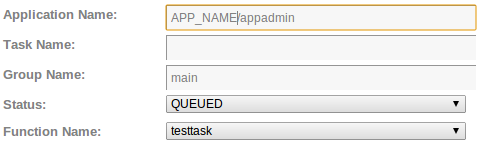
With your new task in there; you are almost ready. You can now start a new web2py instance that will run the tasks for you:
python web2py.py --nogui -K APP_NAME -D15The -D15 indicates Debug loglevel-> 15 is info</>
Output
web2py Web Framework
Created by Massimo Di Pierro, Copyright 2007-2012
Version 2.3.0 (2012-12-07 10:57:44) rc1
Database drivers available: SQLite(sqlite3), MySQL(pymysql), MySQL(MySQLdb), PostgreSQL(pg8000), IMAP(imaplib)
starting single-scheduler for "APP_NAME"...
You will see your tasks being scheduled; it will look like this:

Some quick links
## schedule jobs using
http://127.0.0.1:8000/APP_NAME/appadmin/insert/db/scheduler_task
## monitor scheduled jobs
http://127.0.0.1:8000/APP_NAME/appadmin/select/db?query=db.scheduler_task.id>0
## view completed jobs
http://127.0.0.1:8000/APP_NAME/appadmin/select/db?query=db.scheduler_run.id>0
## view workers
http://127.0.0.1:8000/APP_NAME/appadmin/select/db?query=db.scheduler_worker.id>0
More info
You will find a test case and some code here
Tags
Computerz python git database