Rifftract: Turning Messy Jam Sessions Into Backing Tracks
Every band has the same problem. You spend three hours in a rehearsal room, the phone is propped against the amp recording the whole thing, and somewhere in that 47 minute blob of noodling there are two or three riffs that were actually good. By the time you get home nobody can remember where they were, and nobody is going to scrub through 47 minutes to find them.
So I built a thing. It’s called Rifftract, it lives over at virge-io/rifftract, and the docs are surprisingly complete for a weekend-brain project, so I figured it deserved a proper write-up. The short version: you drop in a rehearsal recording, it finds the repeated/musically interesting bits automatically, draws them on a waveform, and lets you export any region as a looped backing track. Practice material falls out the other end.
This post is a tour of how it’s built, because honestly the architecture is the fun part, and because there are some genuinely great open source libraries doing the heavy lifting that deserve a shout out.
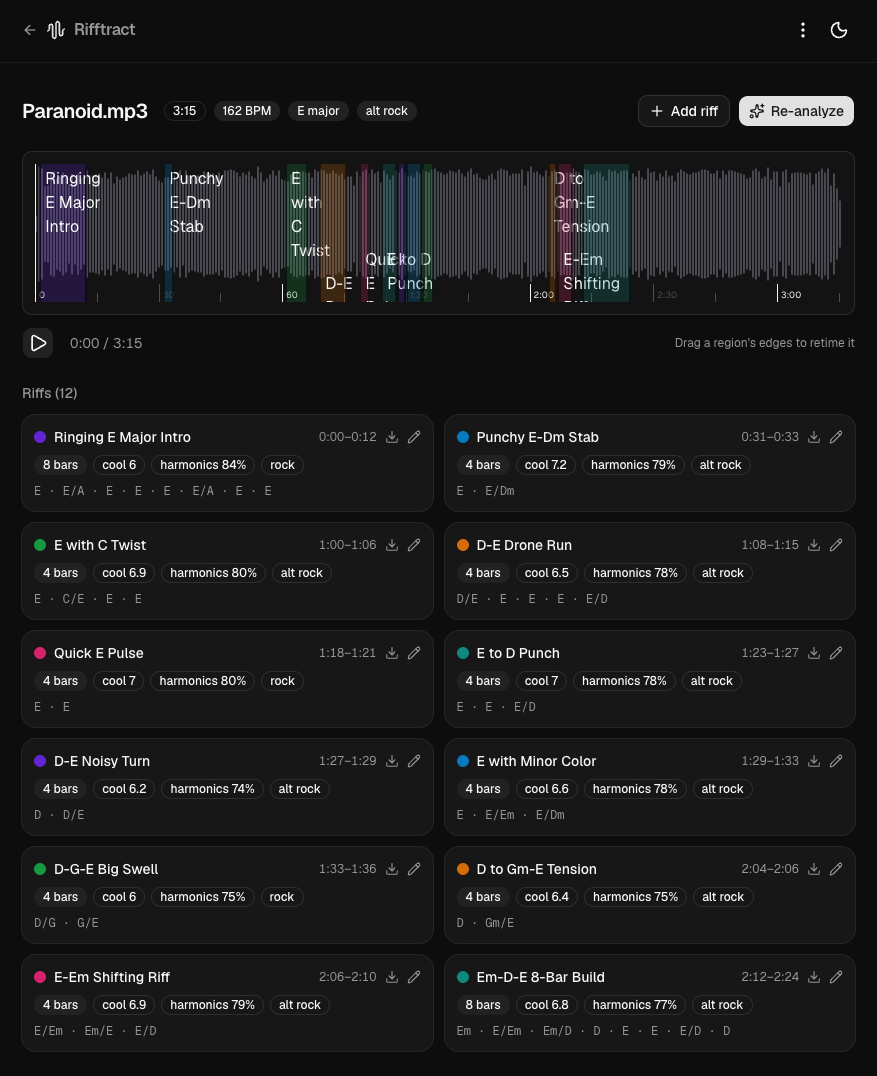
From a three-minute jam to 12 riffs, in one click
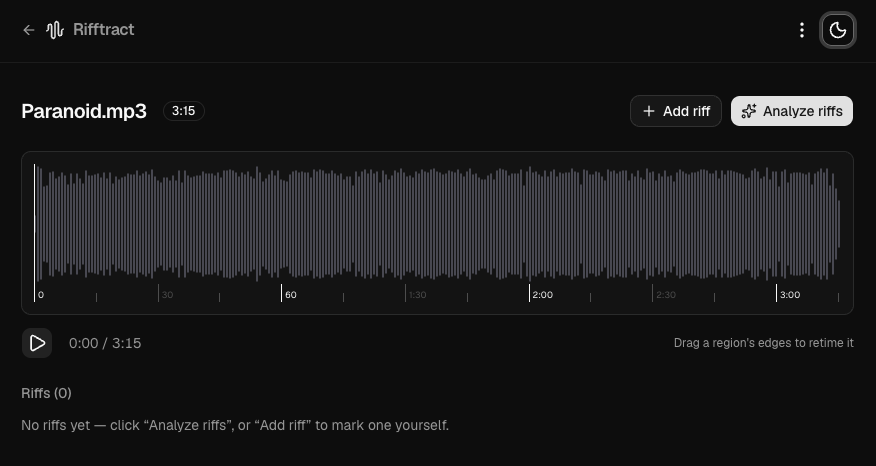
Here’s the entire pitch in two screenshots. You drop in a recording (this is “Paranoid.mp3”, 3:15 of it), and you get a waveform and a very empty riff list:
Then you hit Analyze riffs. A few seconds later Rifftract has worked out the tempo (162 BPM), the key (E major) and the genre (alt rock), carved the track into colour-coded regions, and handed you 12 labelled riffs. Each one comes with a name, a bar count, a “coolness” score, a harmonic-niceness percentage and the actual chords:
That’s the whole thing. One click, twelve practice-ready loops, zero scrubbing. Every card exports straight to a looped backing track. Now let’s look at how it pulls that off.
The big picture
Rifftract is deliberately a local-first app. Your band’s unreleased material never leaves your laptop. The whole thing is four cooperating pieces:
- A Next.js 16 / React 19 app that serves the UI and acts as the orchestrator and API layer.
- A Python sidecar (FastAPI + librosa) that does all the actual music information retrieval.
- ffmpeg for cutting, looping and crossfading audio on export.
- Claude (optional) for cleaning up the auto-generated labels into something human.
The separation is strict and intentional: audio bytes never leave the machine. The sidecar binds to 127.0.0.1 only, Next.js is its sole client, and it passes absolute file paths around instead of re-uploading bytes between processes. The only thing that ever goes to an external service is a small JSON feature summary sent to Claude: tempo, chords, spectral numbers. Never the audio itself. And if you don’t set an API key, that step just doesn’t happen and you get deterministic heuristic labels instead. Offline-first, all the way down.
Browser  ──HTTP──▶  Next.js (UI + API + SQLite)  ──HTTP──▶  Python/librosa sidecar
                          │                                      (127.0.0.1:8000)
                          ├──spawn──▶  ffmpeg  (cut / loop / crossfade)
                          └──HTTPS──▶  Claude  (optional: label refinement only)
The pipeline is where the magic lives
The heart of the project is a 10-stage, librosa-only analysis pipeline in pipeline/analyze.py. Everything runs at 22,050 Hz mono with 512-sample hops (~43 frames/sec) and assumes 4/4, because this is a tool for rock bands, not for analysing Meshuggah (sorry).
Here’s roughly what happens to your audio:
- Load: ffmpeg decodes the MP3/M4A.
- Rhythm: onset strength → global tempo via beat tracking → downbeat phase → bar duration.
- Features: chroma, MFCCs, harmonic/percussive separation (HPSS), RMS energy, spectral centroid/contrast/flatness, zero-crossing rate. Computed once across the whole track.
- Segmentation: beat-synchronised features get stacked into a recurrence matrix, then agglomerative clustering (k between 4 and 24 depending on length) carves the track into segments. Each segment is scored by how often it reappears.
- Candidate selection: keep segments between 2 and 45 seconds, rank by a blended salience score (
0.6 × repetition + 0.4 × energy), take the top 12, sort by time. - Harmony: Krumhansl–Schmuckler key profiles for the key, then 24 triad templates matched against half-bar chroma windows for chords.
- Subjective scoring: this is my favourite bit. A “harmonic niceness” score (0–100, consonance vs. key plus tonalness) and a “coolness” score (0–10) that’s a weighted blend of repetition, rhythmic regularity, spectral contrast, dynamic range, onset density and harmonic niceness. Yes, the computer rates how cool your riff is. No, it is not always wrong.
- Genre: threshold rules over tempo and spectral features spit out metal / funk / rock / ballad / electronic / acoustic / unknown.
- Loop length: rounds each region to {4, 8, 12, 16, 24, 32} bars or flags it “longer”.
- Summary: packages it all into a JSON
featureSummarythat Claude can optionally polish.
Because the region edges are already beat-aligned, the loops are mostly seamless out of the box. On export, ffmpeg’s acrossfade filter can add an optional crossfade (0–500ms) to smooth over the seam entirely.
A shout out to the libraries doing the real work
I want to be clear about something: I wrote glue. The clever parts are other people’s open source work, and they deserve the credit.
- librosa is the absolute star here. Beat tracking, HPSS, chroma, the recurrence matrix, the spectral features, it’s all librosa, and the API is so clean that the entire MIR pipeline reads like pseudocode. This project would simply not exist without it. The maintainers have built something extraordinary.
- wavesurfer.js v7 does all the waveform rendering and the draggable region UI in the browser. The v7 plugin architecture is lovely, and the regions plugin is exactly the interaction model this app needed.
- FastAPI makes the sidecar almost embarrassingly small: a couple of typed endpoints and you’re done.
- better-sqlite3 for synchronous, in-process persistence. No connection pools, no async ceremony, it just survives hot-reloads as a module singleton and gets out of the way.
- shadcn/ui and Tailwind CSS v4 for a UI that looks intentional with very little effort from me.
- ffmpeg, the eternal Swiss Army knife, because of course.
- The numpy / scipy / scikit-learn trio underneath librosa, quietly doing the linear algebra.
If you maintain any of these: thank you. Genuinely. You made a niche little band tool a weekend project instead of a PhD.
The data model and API
The persistence story is refreshingly boring, which is a compliment. Two SQLite tables:
tracks: one row per uploaded file (UUID = the filename stem), withduration,sample_rate,tempo,music_key,genre,label_sourceand timestamps.regions: the detected segments, cascade-deleted with their track. Each hasstart_sec/end_sec,bars,loop_bucket,region_tempo, thecoolnessandharmonic_nicenessscores, pluschords,auto_labelsandcustom_labelsas JSON. There’s anis_manualflag so re-analysing a track replaces the auto-detected regions but never clobbers the ones you drew by hand.
Structural facts live in real columns; the subjective/fuzzy stuff lives in JSON for schema flexibility. The Next.js API is a thin, Zod-validated REST surface over that:
| Endpoint | Method | Purpose |
|---|---|---|
/api/upload | POST | Stream audio in via an x-filename header |
/api/tracks/[id] | GET / DELETE | Fetch (track + regions) or remove |
/api/tracks/[id]/audio | GET | Stream bytes, supports Range for scrubbing |
/api/tracks/[id]/analyze | POST | Kick off sidecar analysis (maxRegions 1–24) |
/api/regions | POST | Create a manual region |
/api/regions/[id] | PATCH / DELETE | Edit (recomputes bars/loop bucket) or remove |
/api/regions/[id]/export | POST | Export a looped region (format, loops 1–10, crossfadeMs) |
One detail I’m quietly proud of: uploads stream straight from request.body into fs.createWriteStream at constant memory, because Next route handlers have no body-size knob and I didn’t want a 200MB rehearsal recording living in RAM.
Running it yourself
It’s genuinely a five-minute setup if you’ve got the prerequisites (Node 22+, the uv Python package manager, and ffmpeg):
sudo apt install -y ffmpeg
npm install
cd sidecar && uv sync && cd ..
cp .env.example .env
npm run dev   # boots Next.js on :3000 and the sidecar on :8000 together
Drop in a recording, hit analyse, and start auditioning your riffs. No API key required. Claude only ever refines labels, it never gates functionality.
So… about a maintainer
Here’s the honest bit. Rifftract scratched a very specific itch I had, the docs are written, the architecture is clean, and it does the thing it set out to do. But it’s early: a handful of commits, no stars, the kind of project that’s one busy month away from quietly bit-rotting.
There’s so much low-hanging fruit here that I’d love to see someone pick up: better segmentation for odd time signatures, a proper test suite around the pipeline, stem separation, a “find the chorus” mode, packaging it as a desktop app. The bones are good and the codebase is small enough to understand in an afternoon.
If you’re into music + Python + a tidy little Next.js app, and you’ve ever wished an open source project had your name in the contributors list, this is a really friendly one to adopt. PRs, issues, and especially anyone who fancies wearing the maintainer hat are all very, very welcome. The Apache 2.0 license is there waiting for you. 😉
Go make some noise: github.com/virge-io/rifftract.