
installing PyQT4 on Mac OSX
For a couple of our projects we used python with the Qt bindings to create a nice GUI.
In our normal mac osx dev environment I installed al Qt stuff with homebrew:
brew install pyqtThis has one problem; it uses the stock python; which is modified by apple.
Specifically, you cannot build standalone application bundles with the system python in OS X using py2app. I still don’t know how we deploy our app, so I will install py2app and pyinstaller later on and test both solutions with a mini pyqt hello world app.
Installing python + pyQt4
So on a clean mac i installed brew with this command:
/usr/bin/ruby -e "$(curl -fsSL https://raw.github.com/gist/323731)"Then I installed python
brew install pythonTo make sure the brew installed python will be used I modified my ~/.profile
#Override default tools with Cellar ones if available
#This makes sure homebrew stuff is used
export PATH=/usr/local/bin:$PATH

#Point OSX to Cellar python
export PYTHONPATH=/usr/local/lib/python:$PYTHONPATH
I started a new Terminal session, to make sure the new profile is used. At this moment you should have a working non stock python on your mac.
brew install pyqtEt voila; you should have a working python2.7.2 with PyQt4.
To test it:
acidmac:~ acidjunk$ python
Python 2.7.2 (default, Nov  4 2011, 20:29:47)
[GCC 4.2.1 (Based on Apple Inc. build 5658) (LLVM build 2336.1.00)] on darwin
Type "help", "copyright", "credits" or "license" for more information.
>>> import PyQt4
Install pyinstaller
Then you need the latest pyinstaller, make sure it’s fresh-> 64 bit support is still experimental. So I downloaded the hourly SVN trunk pyinstaller version and unzipped it to my home folder.
I also needed to install some extra python deps:
http://pypi.python.org/pypi/altgraph/#downloads
http://pypi.python.org/pypi/macholib#downloads
http://pypi.python.org/pypi/modulegraph/#downloads
For 64Bit Mac OSX you have to build the pyinstaller bootloader yourself.
Go to the source folder inside pyinstaller and execute:
python ./waf configure build installYou should have a working pyinstaller now. On my test mac it produces a .app which works.
I issued this commands:
python pyinstaller.py -w ~/myTest/myTest.py
python utils/Build.py myTest/myTest.spec
After copying my qt_menu.nib with:
cp -r /usr/local/Cellar/qt/4.7.4/lib/QtGui.framework/Versions/4/Resources/qt_menu.nib\ myTest/dist/myTest.app/Contents/ResourcesI had a working app, so brilliant stuff from the pyinstaller gurus
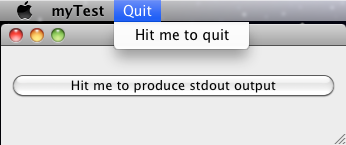

The only, problem at first: this app doesn’t get focus on launch.
You can fix it in your own code by adding
form.raise() right after
form.show() with “form” being whatever you called your instance of MainWindow().
I’ll have to test that still. But another more serious problem appeared when I transferred the app to another mac.
File "/Users/acidjunk/pyinstaller/PyInstaller/loader/iu.py", line 97, in getmod
mod = imp.load_module(nm, fp, attempt, (ext, mode, typ))
ImportError?: dlopen(./PyQt4.QtGui?.so, 2): Library not loaded: /usr/X11/lib/libpng12.0.dylib
Referenced from: /Users/acidjunk/Desktop/myTest.app/Contents/MacOS//QtGui Reason: Incompatible library version: QtGui? requires version 47.0.0 or later, but libpng12.0.dylib provides version 45.0.0
After some mails and a ticket in the pyinstaller ticket system, they fixed the problem in svn trunk r1740. The app now works on a clean OSX 10.6 en 10.7.
Install py2app
because the pyinstaller method uses experimental stuff and I like to have a plan B, I installed py2app also:
curl -O http://peak.telecommunity.com/dist/ez_setup.py
sudo python ez_setup.py -U setuptools
To install or upgrade to the latest released version of py2app:
sudo easy_install -U py2appPy2app behaves a little bit different. For starters it builds the app inside your project. It didn’t find my Qt install at first so I added on extra line to the code.
sys.path.insert(0, "/usr/local/lib/python")Then from inside my project I did:
py2applet --make-setup myTest.icns myTest.pyBefore you can build it you have to edit the generated setup.py file and set argv_emulation to False. Then it should be ready for the build.
python setup.py py2appThat delivered a correct working app but I had to use pysinstaller svn trunk r1740 to get a working app thats runs on OS X 10.6 en OS X 10.7.
Code
In case anyone is interested in the Code I used for testing both deployment methods. you can find it here